How to see your competitors’ ads on LinkedIn Ads, Google Ads and Microsoft Ads
Each ad platform keeps its own library of ads, with its own rules. Where to find a competitor’s ads on LinkedIn Ads, Google Ads and Microsoft Ads, what each library shows, and how to keep track every week.
49%of B2B advertisers ran ads on both LinkedIn Ads and Google Ads in the week of October 5, 2026

Romain GuyonFounder of Overt
Published 9 min read
Jump to section
In short
- LinkedIn Ads: the LinkedIn Ad Library shows every ad that ran on LinkedIn since June 2023, worldwide, until one year after its last impression.
- Google Ads: the Google Ads Transparency Center shows the ads of verified advertisers on Google Search, YouTube, Google Maps, Google Play and Google Shopping, searchable by advertiser or by website.
- Microsoft Ads: the Microsoft Ad Library shows only the ads served on Bing in the European Union and the European Economic Area.
- None of the three shows spend or results, none counts a company’s ads from week to week, and none puts several platforms side by side.
- Half of the B2B companies that advertised in the week of October 5, 2026 ran ads on both LinkedIn Ads and Google Ads: checking one platform shows half the picture.
Why look at more than one ad platform
B2B companies rarely advertise in one place. In the week of October 5, 2026, Overt measured 1,249 companies, most of them B2B software companies, on both LinkedIn Ads and Google Ads. 659 of them ran at least one ad on one of the two:
Where B2B advertisers ran ads that week
659 companies with at least one ad on LinkedIn Ads or Google Ads, week of October 5, 2026
Source: Overt, active ads on LinkedIn Ads and Google Ads, week of October 5, 2026, across 1,249 companies measured on both.
Three in four companies that ran ads on LinkedIn Ads that week also ran ads on Google Ads (322 of 434). Among the companies on both, the median one ran 25 ads on LinkedIn Ads and 22 on Google Ads: neither platform is a side channel. A competitor that looks quiet on one platform may be spending its budget on the other.
LinkedIn Ads: the LinkedIn Ad Library
The LinkedIn Ad Library, at linkedin.com/ad-library, is the place to start for B2B competitors.
- What it covers. Every ad that ran on LinkedIn since June 1, 2023, wherever it ran. Advertisers can’t opt out. An ad stays in the library until one year after its last impression.
- How to search. By company or advertiser, payer, keyword, country and date. The fastest way in is the company’s LinkedIn page: the Posts tab links to its ads.
- What each ad shows. The creative, the format, the advertiser and the payer. For ads targeted to the EU, also the run dates, impressions as a range, the targeting criteria used and the destination link.
The full walkthrough, with screenshots: LinkedIn Ad Library: how to see any company’s ads. To read what you find there, see which LinkedIn ad formats B2B advertisers actually run.
Google Ads: the Ads Transparency Center
Google’s library is the Google Ads Transparency Center, at adstransparency.google.com.
- What it covers. Ads from advertisers verified by Google, across Google Search, YouTube, Google Maps, Google Play and Google Shopping, until one year after they were last shown. In Europe and Türkiye, ads from unverified advertisers too. No account needed.
- How to search. By advertiser name or by website. Searching by website finds the ads that lead to a domain, whichever account runs them. Filters narrow the results by region, platform, date range and format: text, image or video.
- What each ad shows. The ad, its format and when it was last shown, under the advertiser’s verified name and country. For ads shown in Europe, also the first day shown, how many times it was shown, as a range published 90 days late, and which kinds of audience criteria were used, without their values. Never the landing page.
Two habits save time. Search by website as well as by name: a company often advertises through several accounts, and Google itself warns when a domain’s ads come from more than one. And set the region before reading: by default the list mixes every country, and an ad only shows its dates and reach once a European country is selected. The full walkthrough: Google Ads Transparency Center: how to see any company’s Google ads.
Microsoft Ads: the Microsoft Ad Library
Microsoft’s library, at adlibrary.ads.microsoft.com, exists to meet the EU’s Digital Services Act, and its coverage follows from that.
- What it covers. Only ads served on Bing that received impressions in the EU and the European Economic Area, whatever the advertiser’s country, since June 2023. An ad appears within 24 to 48 hours of its first impression there and stays until one year after its last one. Advertisers can’t opt out.
- How to search. By ad content or by advertiser, then by date and by the country where the ad was served.
- What each ad shows. The advertiser and its country, the payer if different, a copy of the ad with its links, start and end dates, estimated impressions in the EU with a split by country, and the general targeting criteria used.
The catch: an ad that only ran in the United States is not in the library. For a competitor that advertises on Bing in North America only, the Microsoft Ad Library shows nothing.
The three libraries side by side
| LinkedIn Ad Library | Google Ads Transparency Center | Microsoft Ad Library | |
|---|---|---|---|
| Ads included | Every ad on LinkedIn | Verified advertisers, plus every advertiser in Europe and Türkiye | Ads served on Bing in the EU and EEA |
| Kept for | One year after the last impression | One year after the last showing | One year after the last impression |
| Search by | Company, payer, keyword | Advertiser, website | Advertiser, ad content |
| Filter by | Country, date | Region, platform, date, format | Country, date |
| Run dates, reach, targeting | Ads targeted to the EU | Ads shown in Europe and Türkiye | Every ad |
| Spend and results | No | No | No |
| Weekly ad count over time | No | No | No |
All three answer the same question, “what is this company running right now?”, one platform at a time. None answers the next ones: is it running more or fewer ads than last month, what launched this week, what stopped, how does it compare with the others in its category.
Other clues worth checking
- The competitor’s website. The tags a company installs show which ad platforms it is set up for, sometimes before its first ad: the LinkedIn Insight Tag, the Google Ads tag, Microsoft’s UET tag, Meta’s pixel, and now OpenAI’s. See which B2B companies are set up for ChatGPT ads, a platform with no ad library yet.
- Destination links. The landing pages and the UTM parameters of an ad say which offer it pushes and which stage of the funnel it serves.
- Your own feed. Retargeting ads only reach people who visited the site: visiting a competitor’s pricing page often brings its ads to you within days.
- Facebook and Instagram. Meta keeps its own ad library for its apps.
A weekly routine across the three
- List the competitors, with each one’s LinkedIn page, website and advertiser names.
- Bookmark one search per competitor and per library: the filters live in the address, so a weekly check takes a few clicks.
- Pick a fixed day. Monday works: the previous week is complete.
- Note what changed: new creatives, offers, calls to action, formats, landing pages. Take screenshots; ads leave the libraries a year after they stop.
- Count the ads on each platform and keep the numbers in a sheet, one row per competitor and per week. None of the libraries keeps that history for you.
With five competitors and three platforms, that is fifteen searches a week, and step 5 takes longer than the others put together.
Following competitors with Overt
Overt does that routine for the companies you follow: every week, it counts their ads on LinkedIn Ads, Google Ads and Microsoft Ads, shows them by format, and flags what is new and what stopped, with the history since January 2026. Several companies sit side by side in a watchlist, and the ads themselves are one click away.
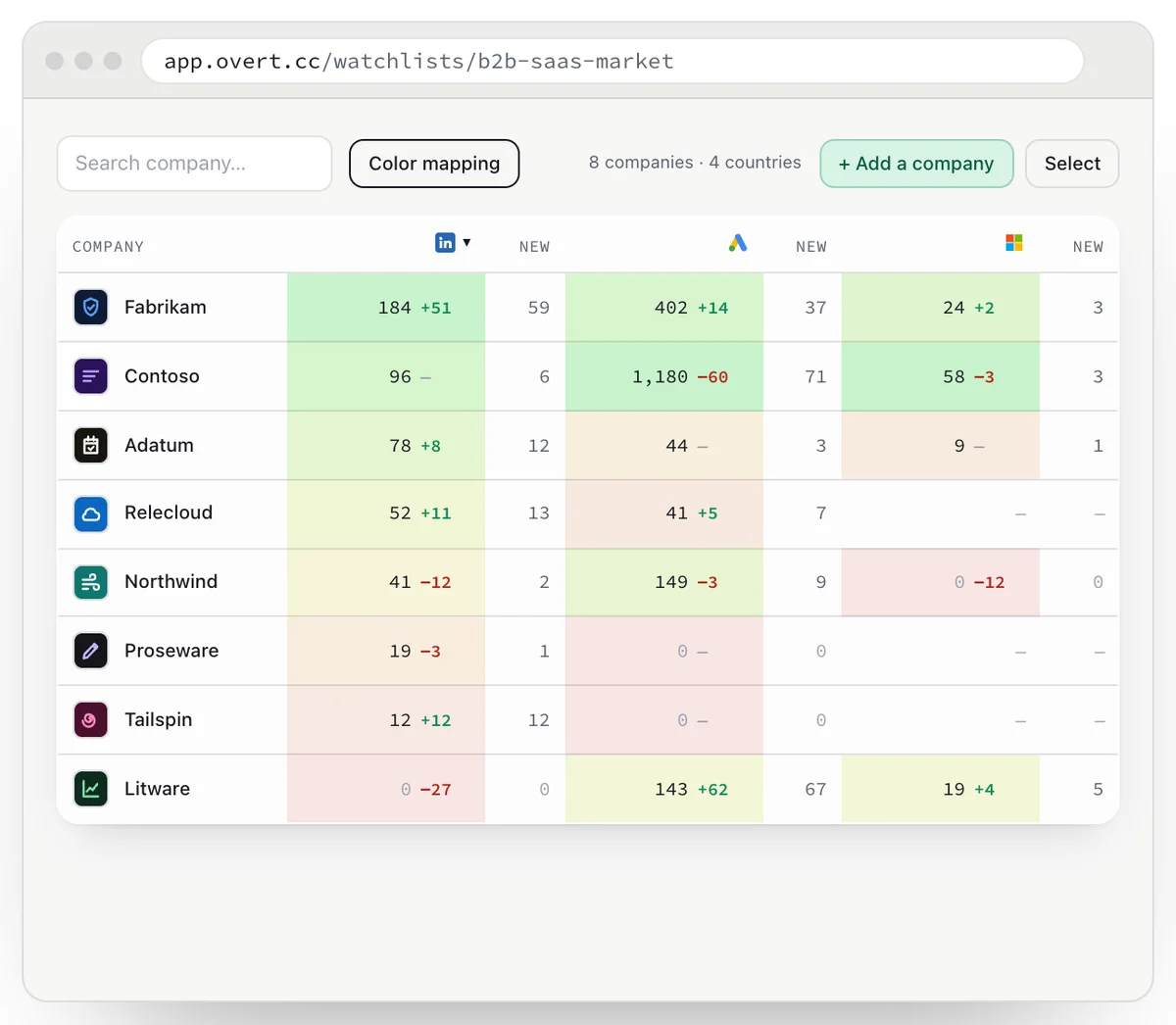
The libraries stay the right tool to look up any advertiser once; Overt is built to follow the ones that matter to you, every week.
Follow your competitors’ ads, every week.
Free for 5 companies. No card required.
Frequently asked questions
How can I see my competitors’ ads?
Each ad platform has its own library: the LinkedIn Ad Library for LinkedIn Ads, the Google Ads Transparency Center for Google Ads, and the Microsoft Ad Library for Microsoft Ads on Bing in Europe. All three are free and need no account. To follow several competitors on all three every week, use a tool such as Overt.
How do I see a competitor’s ads on LinkedIn?
Search the company in the LinkedIn Ad Library at linkedin.com/ad-library, or open its LinkedIn page, go to the Posts tab and follow the link to its ads. Every ad that ran on LinkedIn since June 2023 is there until one year after its last impression.
How do I see a competitor’s Google ads?
Search the advertiser’s name or website in the Google Ads Transparency Center at adstransparency.google.com, then filter by region, platform, date and format. Searching by website also finds the ads other accounts run toward the same domain.
Can I see a competitor’s Bing ads in the United States?
Not in the Microsoft Ad Library: it only includes ads served on Bing in the European Union and the European Economic Area. Ads shown only in the United States don’t appear.
Can I see how much a competitor spends on ads?
No. None of the three libraries shows spend, bids, clicks or conversions. They show the ads, and for ads shown in Europe, run dates and a range of impressions. The number of ads a company runs each week, and how it changes, is the closest public signal of its effort.
Which tool shows competitors’ ads on several platforms at once?
Overt follows the companies you choose on LinkedIn Ads, Google Ads and Microsoft Ads, counts their ads every week, and shows what is new and what stopped. It is free for 5 companies.
Terms used in this guide
- Payer
- The entity billed for an ad. It can differ from the advertiser shown on the ad: a subsidiary, a legal entity in another country, or an agency.
- Digital Services Act
- The EU regulation (Regulation (EU) 2022/2065) whose Article 39 requires very large online platforms and search engines that show ads to publish a searchable repository of them, kept for one year after an ad’s last showing.
- UTM parameters
- Tags added to a destination link (utm_source, utm_campaign…) so the advertiser’s analytics know where a visit came from. Campaign names in them often say which audience or funnel stage an ad serves.
Sources
- LinkedIn Help, LinkedIn Ad Library.
- Google, Ads Transparency Center, frequently asked questions.
- Microsoft Advertising, About the Ad Library.
- Regulation (EU) 2022/2065, Digital Services Act, Article 39.
- Overt, active ads on LinkedIn Ads and Google Ads, week of October 5, 2026, across 1,249 companies measured on both.
Romain Guyon is the founder of Overt, and runs paid media for B2B software companies.